IDS tutorial
Let’s check out the basic IDS functionalities to create a folder with example configuration files, change some settings and run it.
Prerequesites
Running an IDS optimization requires some data:
event information (location, time, magnitude),
seismic or geodetic records of the event,
precalculated Green’s Functions using the DGRN and SPGRN routines (code available on request from Rongjiang Wang),
an installed IDS backend git.pyrocko.org/Wanderelch/ids2020.
Further things might be optional and depend on the use case:
a fault database of potentially activated faults,
a Pyrocko Green’s Function database for P-wave arrival calculation or P-wave arrival time picks.
Initialize a new IDS environment
IDS comes with some simple commands (check the IDS manual):
$ ids

Usage: ids <subcommand> <arguments> ... [options]

Subcommands:

    init          create ids folder structure and example config
    go            run ids source inversion
    harvest       harvest all inversion results (needed to create report)
    report        create inversion result report

To get further help and a list of available options for any subcommand run:

    ids <subcommand> --help
To start the process we need an IDS-digestable directory e.g. Samos. An example configuration file is automatically generated along with a new initialized IDS environment:
$ ids init Samos

ids:siria.apps.ids            - INFO     - (1) configure settings in config file e.g.:
Samos/config/idsconfig_example.conf
ids:siria.apps.ids            - INFO     - (2) run "ids go <config_file>" in directory: "Samos"
The new IDS environment will have a structure like
Samos        # project folder
└── config   # configuration files
    └── idsconfig_example.conf
Configure the optimization
IDS is controlled by a configuration file, which defines input data sets inversion parameters, etc.. When initialized, the IDS environment contains an example file (here it is Samos/config/idsconfig_example.conf), which needs to be adjusted to the use case. It will look something similar like this:
%YAML 1.1
--- !siria.ids.config.IDSConfigFull

# Which version of the IDS backend shall be used (here ids2020)
ids_version: '2020'

# If given, all other paths can be given relative to the current one
path_prefix: '/data/local/home/'

# General dataset configuration
dataset_config: !siria.ids.dataset.DatasetConfig

    # Path to the Pyrocko event file
    events_path: /home/malde/event.txt

    # Event name for which IDS shall run the inversion
    event_name: event1

    # Database of potentially activated faults (optional)
    subfault_path: 'ids/slab2_gem_faults_10km_rake_65.0.txt'

    # If True, IDS will use event time - half duration as rupture origin time.
    # Otherwise event time is used.
    correct_event_duration: true

    # If True, no assumptions on rupture propagation are used to locate
    # the deconvolved signal. If False, a rupture front is assumed to
    # limit the rupture segment, which emits signals.
    use_absolute_location: false

    # Maximum number of stations to be included. If more records are
    # available, IDS will generate a subset based on the best azimuthal
    # and distance coverage.
    nstations_max: 40

# Seismic waveform usage and handling. Multiple TargetGroups with
# different parameters (as distance or frequency) can be given.
waveform_config:
- !siria.ids.targets.waveform.WaveformTargetGroupConfig

    # Epicentral distance range in (m) of any records from the given event
    distance_min: 0.0
    distance_max: 100000.0

    # Path(s) to the raw waveforms
    waveform_paths:
    - /home/malde/.

    # Path(s) to the station meta data and response files
    response_stationxml_paths:
    - /home/malde/response.xml

    # ASCII files for NET.STA, STA or NET.STA.LOC codes of stations to be excluded.
    blocklist_paths: ['data/blacklist/southsandwich_main_combine.txt']

    # Phase definition for the direct P phase arrival
    pphase: '{stored:begin}'

    # Used Pyrocko GF store id to calculate the P phase arrival
    store_id: global_2s_v2

    # Inversion weights of the different components (range from 0. to 1.)
    component_weights: !siria.ids.targets.waveform.ComponentWeight
        north: 1.0
        east: 1.0
        up: 1.0

    # Parameters for response removal
    restitution_config: !siria.ids.targets.waveform.RestitutionConfig

        # Frequency bounds of the restituted waveforms using a tapered frequency window
        frequency_limits:
        - 0.001
        - 0.05
        - 100.0
        - 200.0

        # Time window of the used waveforms
        t_min: '{stored:begin}-60.'
        t_max: '{vel_surface:2.0}'

        # Fading time for tapering (Optional)
        t_fade: 100

        # Target quantity (optional)
        target_quantity: 'velocity'

    # Required time window pre to the P wave arrival to be included in
    # the records (important for baseline corrections and static calculation)
    t_prearrival: -15.0

    # If larger 0., static effects in the waveforms will be fitted.
    # Value can range from 0. to 1.
    static_weight: 0.0

# Optional GNSS data configuration. Thereby static gnss records can be
# fitted. If no data is available, remove this section
gnss_config: !siria.ids.targets.gnss.GNSSTargetGroupConfigFull

# Relative weight of the GNSS dataset
weight: 0.0

# ASCII data input file (check IDS backend code for example)
fn_dat: gnss_data.dat

# Optional InSAR data configuration. Thereby static InSAR ground
# displacement records can be fitted. If no data is available, remove
# this section
insar_config: !siria.ids.targets.insar.InSARTargetGroupConfig

# Relative weight of the InSAR dataset
weight: 0.0

# Number of InSAR grids involved
n_grids: 0

# ASCII data input file (check IDS backend code for example)
dat_path: ./NoInSARData.dat

# IDS Inversion settings
run_config: !siria.ids.config.RunConfig

    # Number of maximum iterations
    n_iterations: 100

    # Path, where the results of the run are stored
    outpath_template: /home/malde/.

    # Time interval for slip snapshots
    deltat_snapshots: 5.0

    # Maximum time (relative to the event time) for slip snapshots
    t_max_snapshots: 50.0

# Green's Function and Synthetic settings
engine_config: !siria.ids.config.EngineConfig

    # Path to IDS stores
    ids_store_superdirs:
    - .

    # Path to Pyrocko GF stores
    pyrocko_store_superdirs:
    - .

    # id of the GF store required for IDS waveform fitting
    ids_waveform_store_id: .

    # id of the GF store required for IDS fitting of static data
    ids_geodetic_store_id: .

    # Don't touch the following
    ids_geodetic_files:
        R: ur
        T: ut
        Z: uz

    # Filter settings for IDS for synthetic waveforms
    ids_synthetic_bp_filter: !siria.ids.config.FilterSetting
        order: 3
        f_min: 0.0
        f_max: 0.5
Tipps:
Tipp 1: Setting the paths may not be trivial. You should set path_prefix and outpath_template that they point into your current IDS directory. path_prefix should define the core path, all data and the IDS environment are contained in. For example, if you have placed the Samos folder in /home/seismologic/ids/ and all the data is available in /home/seismologic/data/, you should consider the following path definitions:
path_prefix:/home/seismologic/outpath_template:ids/Samos/runs/run1waveform_paths:data/waveformsresponse_stationxml_paths:data/metadata/stations.xml
Tipp 2: The event name can be automatically added into the path variables. Assuming, data is stored in /home/seismologic/data/Samos_2020 with Samos_2020 being the event name defined in the event file. Then, you can set your data paths with a string formatter to fill in the event name automatically. For example, instead of defining waveform_paths: /home/seismologic/data/Samos_2020/waveforms/ you can set it as waveform_paths: /home/seismologic/data/{event_name}/waveforms/. The same behaviour is implemented for all path variables in the configuration file.
Tipp 3: If you want to use a predefined fault database, the file must look the following:
lat[deg]    lon[deg]   depth[km]  length[km]   width[km] strike[deg]    dip[deg]   rake[deg]
-54.8250    -28.4468      1.3336      8.8239      8.3061    110.8334     18.7258     65.0000
-54.8893    -28.4967      4.1206      9.0700      8.3076    111.0082     20.4925     65.0000
Coordinates and depth refer to the center of the given subfault. Subfault dimensions are given by length and width. The rake controlls the mechanism of the subfault.
Run and inspect the optimization
Once, the configuration file is adjusted, it can be used within an IDS optimization using the command go:
ids go config/idsconfig_example.conf
If followed the tipps section, the Samos IDS environment would then look similar to
Samos        # project folder
├── config   # configuration files
│   ├── idsconfig_example.conf
.   .
└── runs     # run folder
    └── run1
where the optimization data is stored in Samos/runs/run1. When the optimization is done, a report is generated using
ids report runs/idsrun_example/
Finally, the IDS environment folder structure could look similar like the following example:
Samos        # project folder
├── config   # configuration files
│   └── idsconfig_example.conf
├── report   # generated report folders
│   ├── components
│   ├── scripts
│   └── samos_2020  # event name for which reports are generated
│       └── run1  # run name
│           ├── misfit  # image of misfit evolution per iterations
│           ├── slipmap  # map view of the distributed slip
│           ├── slipview  # on plane view of the distributed slip
│           ├── station_map  # maps of the station locations
│           ├── stf  # extracted source time function
│           └── waveforms  # images of the waveform fits
└── runs
    └── run1
Currently, the report function does only generate images for a reporting gui, which is currently developed. Nevertheless, the generated images can already help inspecting the quality of the optimization. The example folder structure above would require to, e.g., inspect the images in Samos/report/samos_2020/run1/waveforms to check the waveform misfits. Exemplary images are shown below:
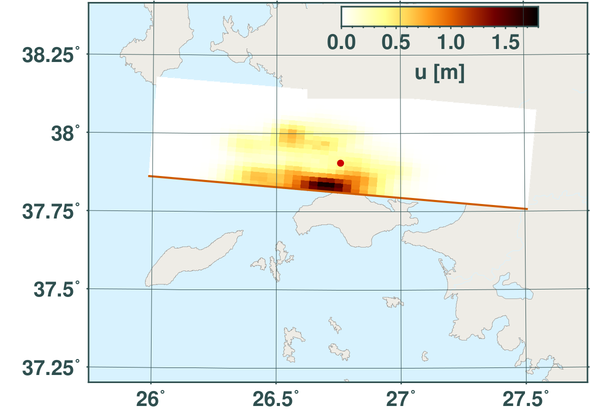
Final slip map as a result of an IDS run and report done for the 2020 Samos, Greece, earthquake.
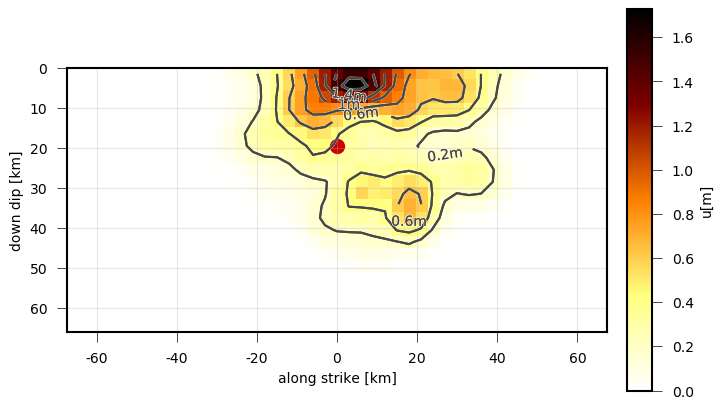
On plane view of the final static slip as a result of an IDS run and report done for the 2020 Samos, Greece, earthquake.
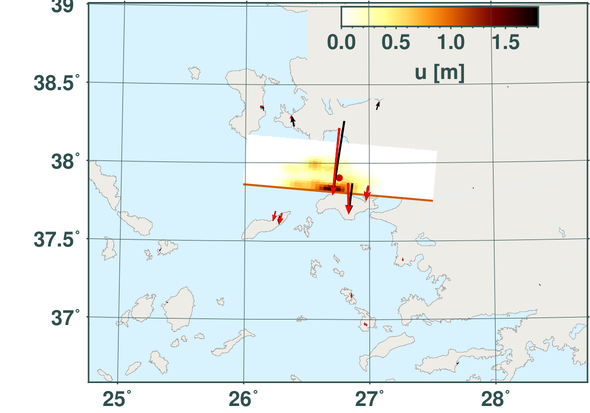
Final slip map plotted together with the GNSS data fits (red- synthetic, black - observed) as a result of an IDS run and report done for the 2020 Samos, Greece, earthquake.
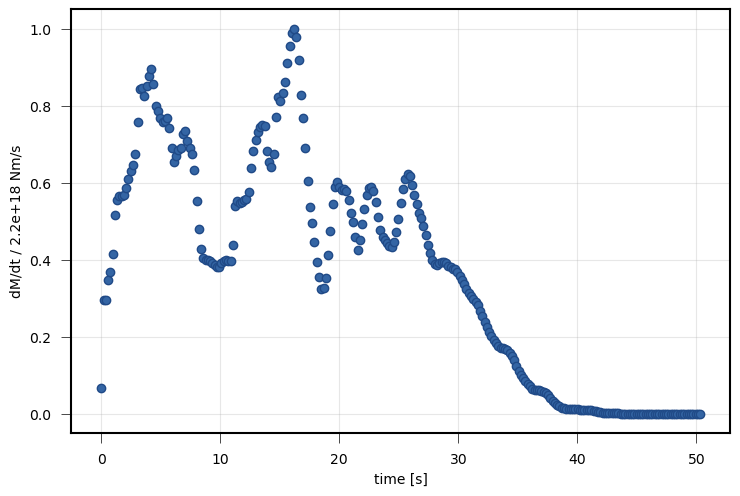
Source time function derived from the snapshots from an IDS run and report done for the 2020 Samos, Greece, earthquake.
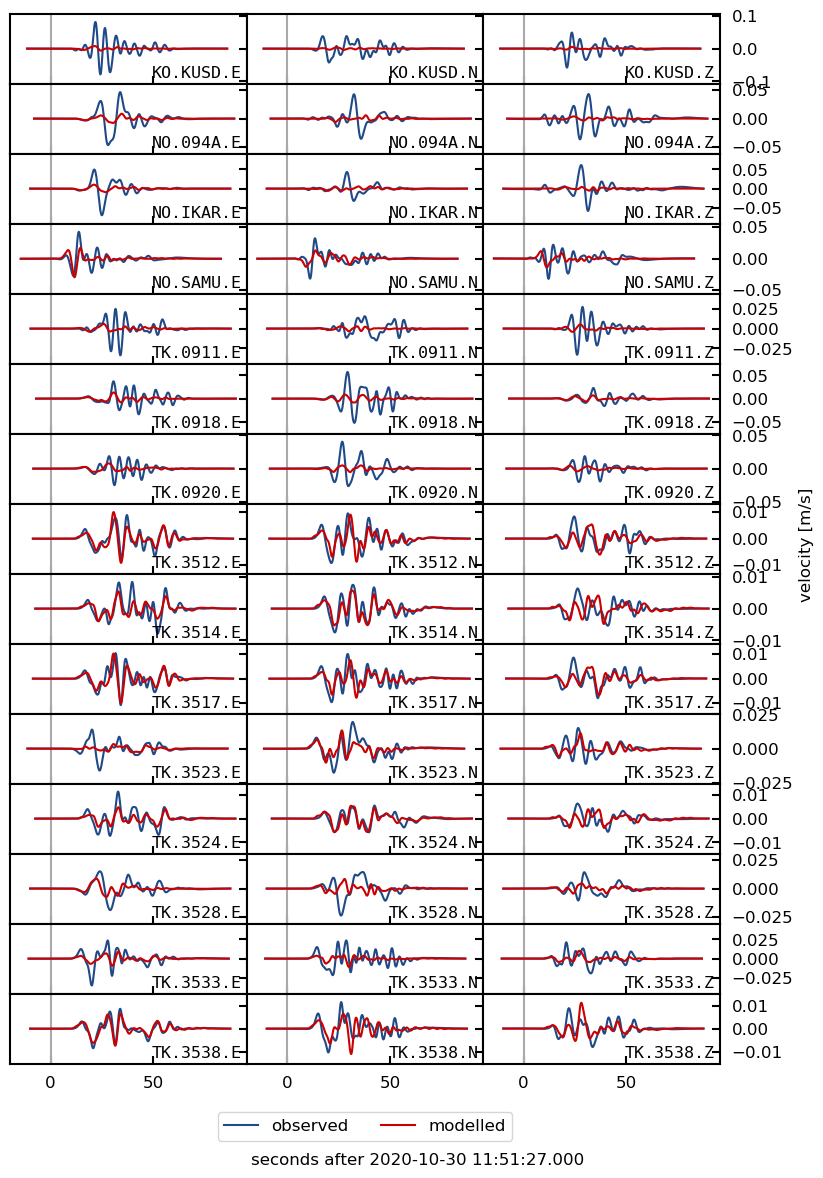
Waveform fits (red- synthetic, black - observed) as a result of an IDS run and report done for the 2020 Samos, Greece, earthquake.